
Assisted conversion vs Linear distribution
The way you look at your data changes how you read your experiment results. The Attribution model filter controls how credit for a conversion is shared when a visitor took part in more than one experiment on the way to converting.
You can set it on the A/B Testing page, above the list of experiments, and in the Performance tab of an experiment report. Two models are available: Linear distribution and Assisted conversion.
A worked example
Imagine an A/B test on the home page with a Control (the original page, with no changes) and a Variation #1 that has a completely different design.
Visitors who see the Control are shown a pop-up overlay with a 15% discount coupon. Visitors who land on Variation #1 are shown a different overlay (a different design, also with a 15% discount coupon). So every visitor has a path through your site that can cross two experiments.
Now say a visitor lands on Variation #1 of the A/B test, is later shown the second overlay, and ends up buying a product worth $300. Because this visitor went through two experiments before converting, the performance of each experiment can be read in two different ways.
Linear distribution
In the linear attribution model, every touchpoint in the conversion path shares the credit equally. Here the touchpoints are the A/B test and the overlay, so each gets 50% of the credit for the same sale.
The product was worth $300 and each experiment is considered equally responsible, so $150 is attributed to the A/B test and $150 to the overlay.

Assisted conversion
In the assisted conversion model, the credit is not split. Each experiment the visitor went through is treated as fully responsible for the conversion, at 100%.
The same $300 sale is therefore attributed once to the A/B test and once, in full, to the overlay that offered the 15% discount: $300 for the A/B test and $300 for the overlay.

With assisted conversion, the combined revenue across experiments adds up to more than you actually earned. In this example the two experiments together show $600, but the real sale was $300. Use it to see how much each experiment contributed to conversions that involved it, not as a total of your revenue.
Comparing the two models on the same experiment
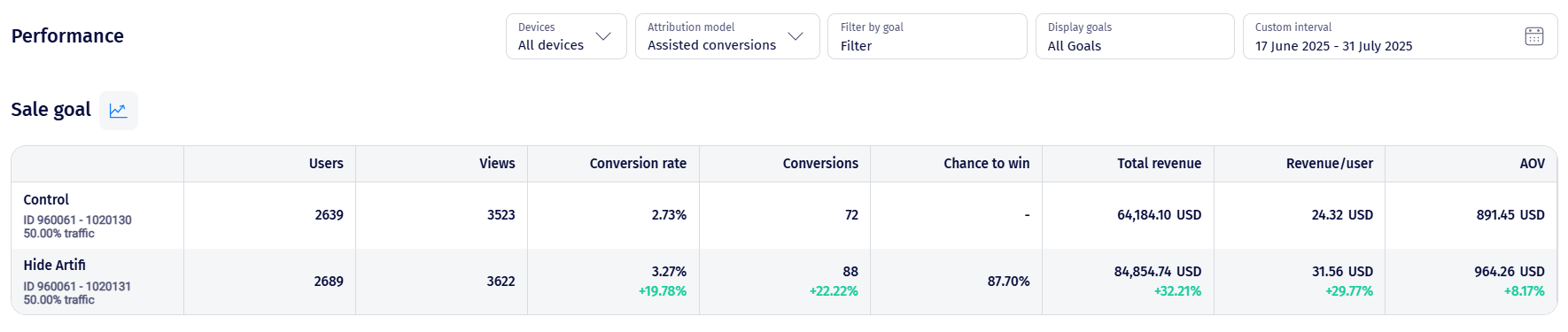
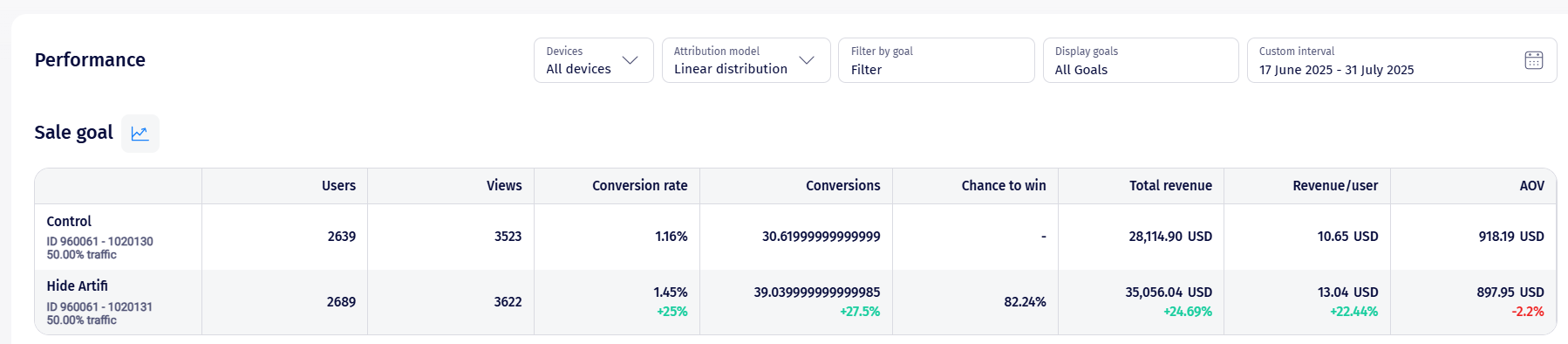
The two screenshots below show the same experiment and the same dates, once with each model. The number of Users and Views does not change. What changes is how the revenue is attributed, so the Total revenue, Revenue/user and AOV columns differ noticeably.
Assisted conversion:
Linear distribution:
For more about the filters on the Performance tab, see Read an Experiment Report.