
Integrate with SalesManago
Overview
SalesManago is a marketing automation tool that monitors visitor engagement, applies custom tags and attributes, and calculates lead scores. Integrating it with Explore lets you use that SalesManago data to segment visitors and personalize your experiments.
Step 1 - Find your SalesManago credentials
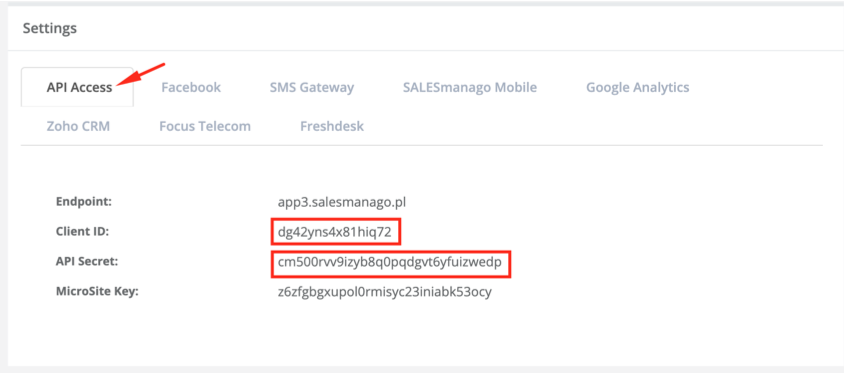
In SalesManago, go to Settings → Integration, and find your Client ID and API Secret.
Step 2 - Connect SalesManago with Explore
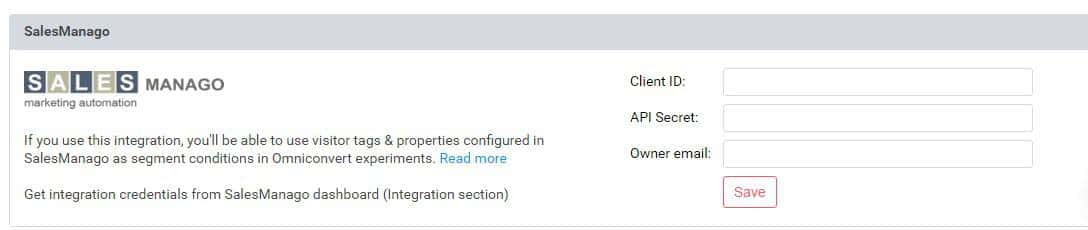
In the Explore Integrations section, enter your SalesManago credentials. For Owner email, use the same email address you use to log into SalesManago. Press Save.
Step 3 - Segment using SalesManago data
When creating a new segment, you'll find a condition called SalesManago parameter. Available parameters:
-
name -
email -
phone -
score -
state -
tag.NAME- whereNAMEis a tag you've already set up in SalesManago -
property.NAME- whereNAMEis a property you've already set up in SalesManago
Using SalesManago data as dynamic variables
Beyond segmentation, you can also insert SalesManago visitor information directly into your creatives as dynamic variables.
Example: {SALESMANAGO[name]}, {SALESMANAGO[tag.name]}