
Integrate with Inspectlet
Step 1 - Enable Inspectlet in Explore
-
Click your website name to open the dropdown, then select Integrations.
-
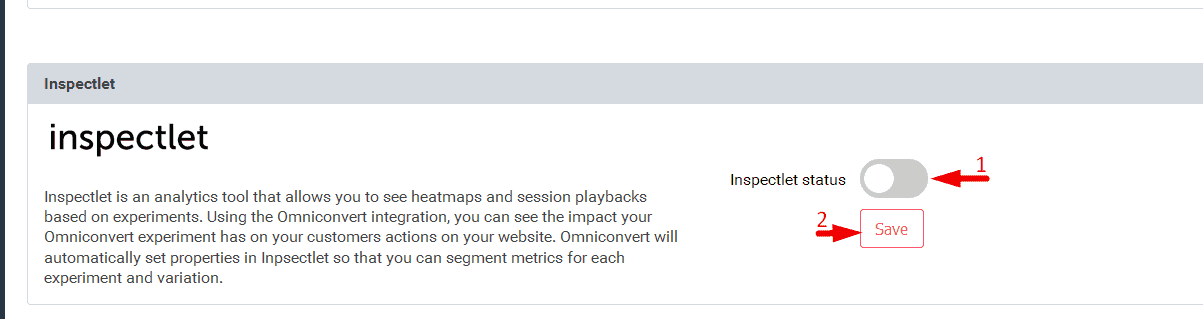
Activate the connection with Inspectlet and click Save.
Step 2 - View Session Recordings in Inspectlet
-
In Inspectlet, open your dashboard and click Session Recordings.
-
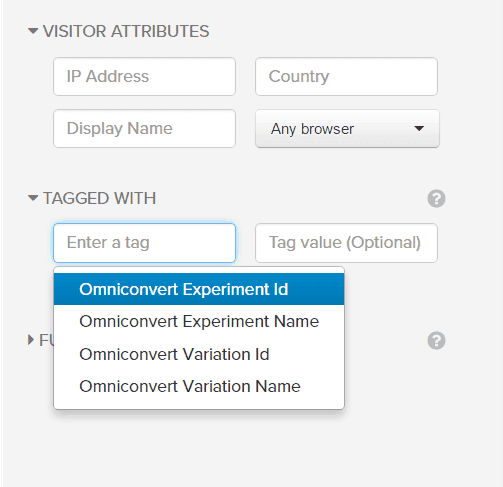
Use the filter panel on the right - scroll to Tagged With.
-
Select the type of Omniconvert tag you want to filter by, and enter the corresponding value.
Step 3 - View Heatmaps in Inspectlet
-
Click Heatmaps on the dashboard.
-
Use the search bar to find the experiment heatmap by experiment ID or variation ID.
Note
You can find the experiment ID and variation ID in the experiment's statistics.