
Understand Statistical Significance & SRM
What is Chance to Win?
Chance to Win is Explore's term for what other tools call statistical significance or confidence level. It answers two questions:
-
How confident can you be that an uplift or downlift wasn't caused by random chance?
-
How likely is it that, given the same conditions, this outcome would repeat?
Example: a 95% chance to win means you can be 95% confident the difference between Control and Variation is real, not noise.
When has my experiment reached statistical relevance?
We recommend letting an experiment run until all of these conditions are met at the same time:
-
At least 2,500 unique users per variation.
-
At least 200 conversions on the main goal.
-
The experiment has run for at least 1.5 buying cycles for your specific product or industry.
-
Chance to Win and Bayesian probability are both above 95% for a winning variation.
If the first three conditions are met but Chance to Win stays below 95%, the correct conclusion is that the tested idea should not be implemented - not that you should keep waiting indefinitely.
Frequentist vs. Bayesian
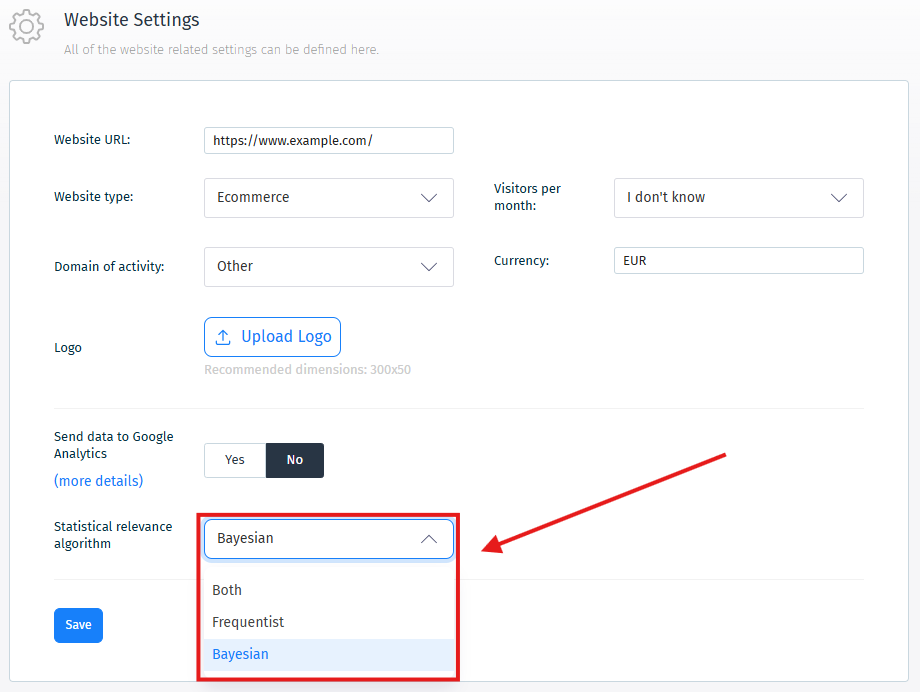
Chance to Win (Frequentist) and Bayesian probability are the results of two different statistical algorithms. You can display both in your reports, or choose just one.
To set this, click your website name to open the dropdown, select Edit Website, and choose either or both algorithms.
Sample Ratio Mismatch (SRM)
What is SRM?
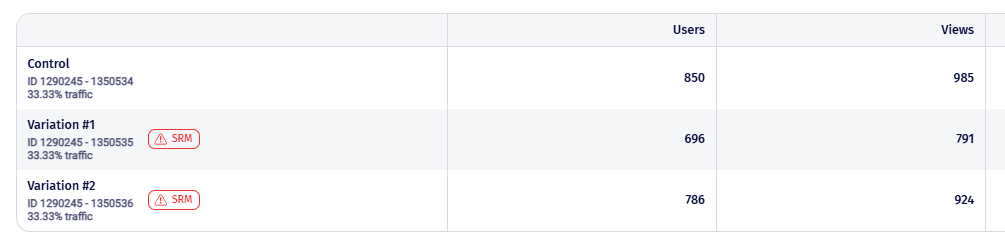
SRM happens when the actual distribution of visitors across your variations doesn't match what you configured. For example, a 50/50 traffic split that actually shows 65% in Variation A and 35% in Variation B.
An SRM makes your results unreliable - it's a signal that something in your setup or tracking may be wrong, not just statistical noise.
How Explore detects it
Explore automatically monitors for SRM and displays a notification directly on the experiment if a mismatch is detected.
Common causes
-
Changing traffic allocation mid-experiment.
-
Unequal traffic splits between variations (e.g. Control 10% - Variation 90%).
-
Changing eligible device types mid-experiment (e.g. moving from All Devices to Mobile only).
-
Bot traffic scraping disproportionately from one variation, despite the tracking code being built to exclude bots in most cases.
-
Internal traffic - your team repeatedly visiting the page during reviews or demos, or internal testing tools hitting the experiment endpoint many times.
Do's and Don'ts for avoiding SRM
Device types
-
Don't add or remove eligible devices while the test is running.
-
Don't assume traffic remains balanced after changing the device segment.
-
Do decide your full device list before launching, and lock the scope.
Traffic allocation
-
Don't change traffic allocation between variations unless the test is fully stopped.
-
Don't edit live variations - it resets conditions unfairly.
WarningIf you have 3 variations and one is clearly outperforming the others, don't just increase its traffic while decreasing the rest mid-test. Instead, duplicate the experiment, remove the unwanted variations from the copy, and publish that as a new experiment.
-
Do QA and approve every variation before going live.
-
Do clone and restart the test if major edits are genuinely needed.
-
Do check experiment traffic logs - spikes or gaps often reveal mid-test pauses that could explain an SRM.
Still not sure?
If you're unsure whether SRM is affecting your test, or need help investigating a possible mismatch, reach out via the chat feature in your Explore account.