
Integrate with BigCommerce
Overview
Integrating Explore with BigCommerce involves two parts: installing the general tracking code, and installing the conversion (Sale goal) tracking code.
Step 1 - Install the general tracking code
-
Go to your store's Design section.
-
Click Edit HTML/CSS.
-
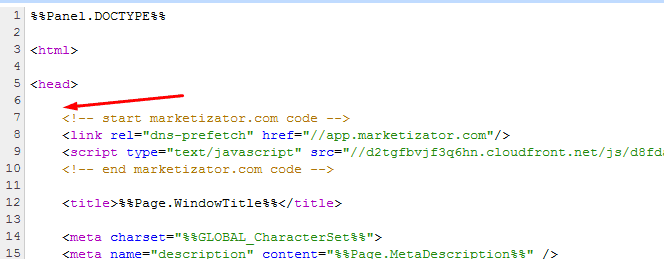
Open the Panels/HTMLHead.html file.
-
Paste the Explore tracking code immediately after the opening
<head>tag.
Step 2 - Install the conversion tracking code
-
Go to Customize your store → Conversions.
-
Paste the following code exactly as shown:
<script>_mktz.push(['_Goal','sale','%%ORDER_AMOUNT%%',{transaction:'%%ORDER_ID%%'}]);</script>Warning
%%ORDER_AMOUNT%% and %%ORDER_ID%% are BigCommerce's own template variables - paste the code exactly as shown, without replacing them. BigCommerce automatically fills in the actual order amount and ID when this page loads.