
QA a Goal
Overview
Before trusting your experiment data, it's worth confirming that a goal actually fires when it should. This article covers two complementary ways to check.
Method 1 - Browser console (via the extension)
With the browser extension installed, open your browser's developer tools console while performing the action tied to your goal (clicking a button, scrolling to a certain point, reaching a thank-you page, etc.).
If the goal fires correctly, you'll see a log entry in this format:
[AGENCY-TESTER] Custom goal with name goal-name and with value N/A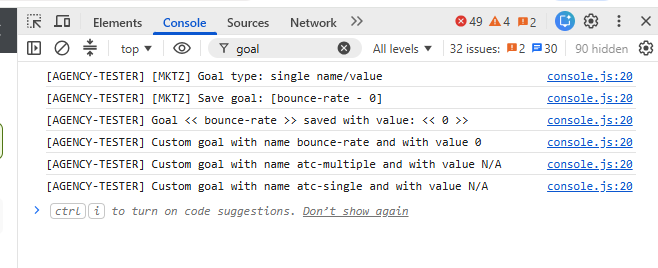
value N/A means no numeric value was attached to that conversion - this is expected for most goal types except Sale, where you'd expect to see the actual transaction value logged instead.
If you perform the action and don't see a matching log entry appear, the goal isn't firing - the issue is likely in how it's set up (wrong selector, wrong trigger, or missing integration code).
Method 2 - Advanced Goals section
From the left menu, go to Advanced → Goals. This shows every goal set up for the website, along with its Goal Count.
Goal Count reflects every time that goal has been recorded, even outside of active experiments. This makes it a reliable way to confirm a goal is technically firing at all - independent of whether it's currently attached to a running test.
Putting it together
Use both methods to isolate where a problem might be:
-
Console shows the event firing, but Goal Count isn't increasing → likely a platform-side issue, worth contacting support.
-
Console doesn't show the event firing at all → the goal's setup (selector, trigger, integration code) is likely incorrect - double check it against Goals Overview or the specific goal type's article.
-
Goal Count is increasing, but conversions aren't showing in your experiment's report → the goal may not be properly attached to that experiment, or the visitor wasn't included in the experiment's segment when they converted.